> ## Documentation Index
> Fetch the complete documentation index at: https://docs.plura.ai/llms.txt
> Use this file to discover all available pages before exploring further.
# API Call Node
> Connects with external APIs to send and retrieve data
## Overview
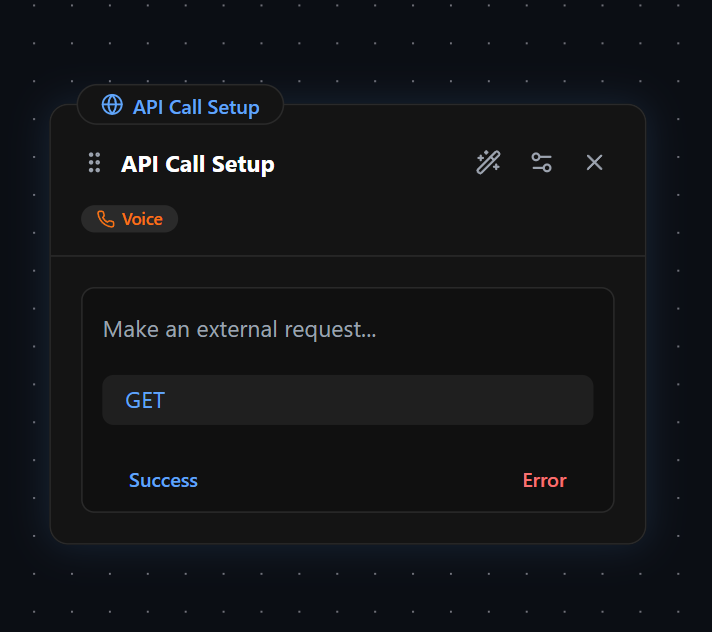
The **API Call Node** is unique in that it does not include a **Response Setup** section like other nodes. Instead, its primary function is to **send API requests** and optionally process the returned data for use within the workflow.
## API Call Setup
The **API Call Setup** section allows the node to interact with external systems by sending requests and processing responses. This enables dynamic workflows where AI can retrieve, store, and utilize external data in real-time. Calls can be configured to authenticate, structure, and format data according to the requirements of the external API.
### API Call Setup Sections
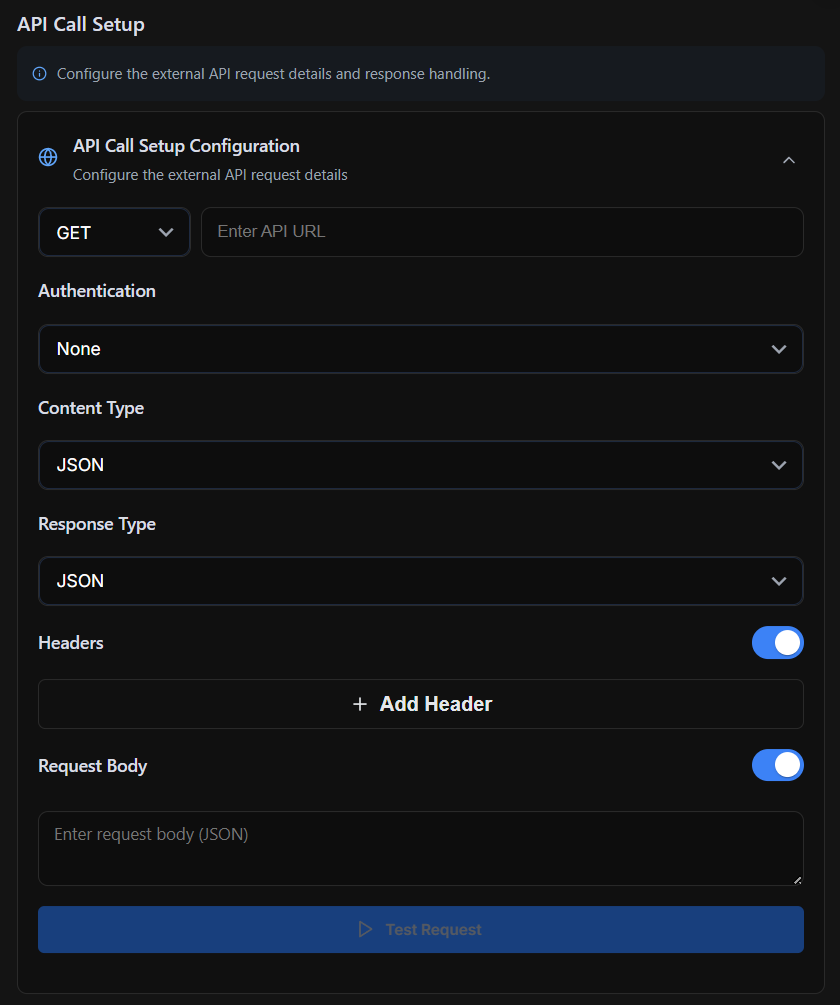
> **Request Method & URL** – Selects the HTTP method (GET, POST, etc.) and specifies the API endpoint.
>
> **Authentication** – Defines the authentication method required for the API (None, Basic Auth, Bearer Token, API Key).
>
> **Content Type** – Specifies the format of the request payload (e.g., JSON, Form Data, Plain Text).
>
> **Response Type** – Determines the expected format of the API response (e.g., JSON, XML, plain text).
>
> **Headers** – Allows adding custom headers required for authentication or API-specific configurations.
>
> **Request Body** – Defines the data sent in the API request, applicable for POST, PUT, and PATCH requests.
>
> **Test Request** – Provides a way to test the API call setup before integrating it into the workflow.
### Key Capabilities
* **Send Data** – Forward collected user inputs to an external system.
* **Retrieve Data** – Request and integrate external information into the workflow.
* **Store API Responses** – Extract and save response values for later use.
* **Authentication & Headers** – Configure authentication methods and custom headers.
* **Request & Response Format** – Define the structure of requests (e.g., JSON, form data) and expected responses.
For example, a workflow could ask the user for a **date**, extract that input, send an API request to check **available time slots**, store the response in a variable, and then use it dynamically in the conversation.
## Pre-Request Response
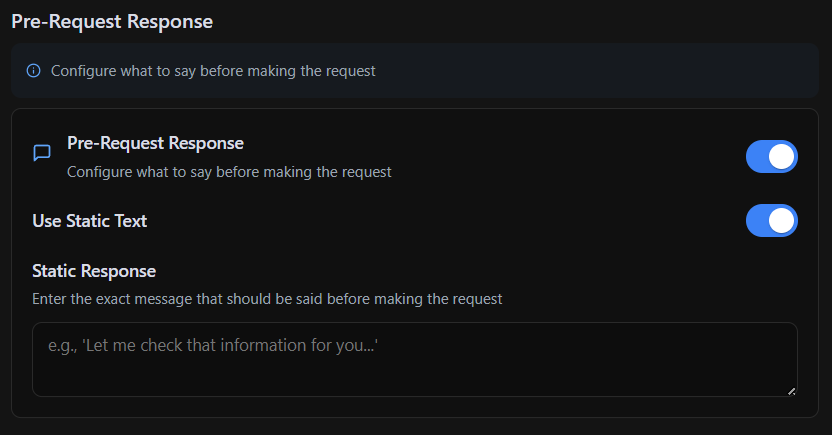
Since this node lacks a standard **Response Setup**, it includes an optional **Pre-Request Response** section. When enabled, this allows the AI to send a message before the API request is executed. This can serve as a buffer message, such as:
> *"Please wait while I check available time slots for that date."*
The **Pre-Request Response** supports:
* **AI Prompt Mode** – Dynamically generates responses.
* **Static Response Mode** – Sends a fixed, predefined message.
By combining **API calls** with **Pre-Request Responses**, this node enables dynamic, data-driven interactions within the workflow.
 ## API Call Setup
The **API Call Setup** section allows the node to interact with external systems by sending requests and processing responses. This enables dynamic workflows where AI can retrieve, store, and utilize external data in real-time. Calls can be configured to authenticate, structure, and format data according to the requirements of the external API.
## API Call Setup
The **API Call Setup** section allows the node to interact with external systems by sending requests and processing responses. This enables dynamic workflows where AI can retrieve, store, and utilize external data in real-time. Calls can be configured to authenticate, structure, and format data according to the requirements of the external API.
 ### API Call Setup Sections
> **Request Method & URL** – Selects the HTTP method (GET, POST, etc.) and specifies the API endpoint.
>
> **Authentication** – Defines the authentication method required for the API (None, Basic Auth, Bearer Token, API Key).
>
> **Content Type** – Specifies the format of the request payload (e.g., JSON, Form Data, Plain Text).
>
> **Response Type** – Determines the expected format of the API response (e.g., JSON, XML, plain text).
>
> **Headers** – Allows adding custom headers required for authentication or API-specific configurations.
>
> **Request Body** – Defines the data sent in the API request, applicable for POST, PUT, and PATCH requests.
>
> **Test Request** – Provides a way to test the API call setup before integrating it into the workflow.
### Key Capabilities
* **Send Data** – Forward collected user inputs to an external system.
* **Retrieve Data** – Request and integrate external information into the workflow.
* **Store API Responses** – Extract and save response values for later use.
* **Authentication & Headers** – Configure authentication methods and custom headers.
* **Request & Response Format** – Define the structure of requests (e.g., JSON, form data) and expected responses.
For example, a workflow could ask the user for a **date**, extract that input, send an API request to check **available time slots**, store the response in a variable, and then use it dynamically in the conversation.
## Pre-Request Response
Since this node lacks a standard **Response Setup**, it includes an optional **Pre-Request Response** section. When enabled, this allows the AI to send a message before the API request is executed. This can serve as a buffer message, such as:
### API Call Setup Sections
> **Request Method & URL** – Selects the HTTP method (GET, POST, etc.) and specifies the API endpoint.
>
> **Authentication** – Defines the authentication method required for the API (None, Basic Auth, Bearer Token, API Key).
>
> **Content Type** – Specifies the format of the request payload (e.g., JSON, Form Data, Plain Text).
>
> **Response Type** – Determines the expected format of the API response (e.g., JSON, XML, plain text).
>
> **Headers** – Allows adding custom headers required for authentication or API-specific configurations.
>
> **Request Body** – Defines the data sent in the API request, applicable for POST, PUT, and PATCH requests.
>
> **Test Request** – Provides a way to test the API call setup before integrating it into the workflow.
### Key Capabilities
* **Send Data** – Forward collected user inputs to an external system.
* **Retrieve Data** – Request and integrate external information into the workflow.
* **Store API Responses** – Extract and save response values for later use.
* **Authentication & Headers** – Configure authentication methods and custom headers.
* **Request & Response Format** – Define the structure of requests (e.g., JSON, form data) and expected responses.
For example, a workflow could ask the user for a **date**, extract that input, send an API request to check **available time slots**, store the response in a variable, and then use it dynamically in the conversation.
## Pre-Request Response
Since this node lacks a standard **Response Setup**, it includes an optional **Pre-Request Response** section. When enabled, this allows the AI to send a message before the API request is executed. This can serve as a buffer message, such as:
 > *"Please wait while I check available time slots for that date."*
The **Pre-Request Response** supports:
* **AI Prompt Mode** – Dynamically generates responses.
* **Static Response Mode** – Sends a fixed, predefined message.
By combining **API calls** with **Pre-Request Responses**, this node enables dynamic, data-driven interactions within the workflow.
> *"Please wait while I check available time slots for that date."*
The **Pre-Request Response** supports:
* **AI Prompt Mode** – Dynamically generates responses.
* **Static Response Mode** – Sends a fixed, predefined message.
By combining **API calls** with **Pre-Request Responses**, this node enables dynamic, data-driven interactions within the workflow.