> ## Documentation Index
> Fetch the complete documentation index at: https://docs.plura.ai/llms.txt
> Use this file to discover all available pages before exploring further.
# Transfer Call Node
> Redirects the conversation to a human agent or another system
## Overview
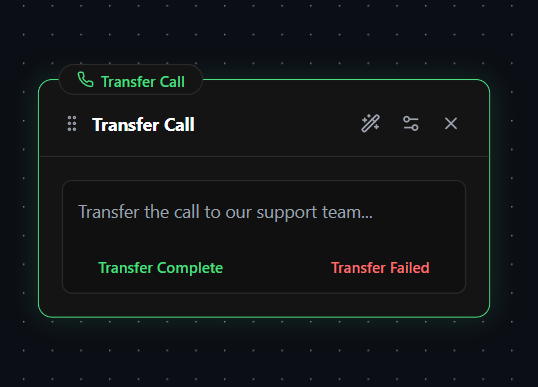
The **Transfer Call Node** is used to redirect an ongoing call to a specified phone number. This ensures seamless call handoffs to another agent, department, or external service while marking the completion of the workflow.
## Key Feature: Transfer Setup
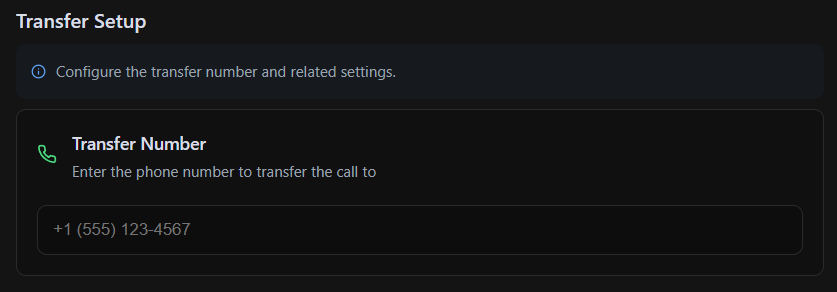
The **Transfer Call Node** includes a dedicated **Transfer Setup** section where you can input the **phone number** the call should be transferred to. Once the transfer is initiated, the AI hands off the call, and the workflow ends.
## Functionality
When the **Transfer Call Node** is triggered, the AI will:
* Optionally provide a **predefined response** before transferring.
* **Dial the specified number** from the **Transfer Setup** section.
* **Hand off the call**, ending the AI interaction and completing the workflow.
This node is essential for managing call escalations, routing users to the appropriate contacts, and ensuring smooth handoffs between automated and human interactions.
 ## Key Feature: Transfer Setup
The **Transfer Call Node** includes a dedicated **Transfer Setup** section where you can input the **phone number** the call should be transferred to. Once the transfer is initiated, the AI hands off the call, and the workflow ends.
## Key Feature: Transfer Setup
The **Transfer Call Node** includes a dedicated **Transfer Setup** section where you can input the **phone number** the call should be transferred to. Once the transfer is initiated, the AI hands off the call, and the workflow ends.
 ## Functionality
When the **Transfer Call Node** is triggered, the AI will:
* Optionally provide a **predefined response** before transferring.
* **Dial the specified number** from the **Transfer Setup** section.
* **Hand off the call**, ending the AI interaction and completing the workflow.
This node is essential for managing call escalations, routing users to the appropriate contacts, and ensuring smooth handoffs between automated and human interactions.
## Functionality
When the **Transfer Call Node** is triggered, the AI will:
* Optionally provide a **predefined response** before transferring.
* **Dial the specified number** from the **Transfer Setup** section.
* **Hand off the call**, ending the AI interaction and completing the workflow.
This node is essential for managing call escalations, routing users to the appropriate contacts, and ensuring smooth handoffs between automated and human interactions.